
.avif)


August 2026 Product Update
This month's releases are focused on one thing: giving your front desk time back. Less chasing patients for insurance details, less manual entry at check-in, and less confusion about who's handling which message.


.svg.avif)

Messaging
Loop in the right teammate without leaving the thread
You can now tag people and teams directly inside a patient conversation. Open the menu next to any thread and tag a specific staff member or a shared tag like Billing or Scheduling to hand the conversation off without duplicating it in a separate channel.
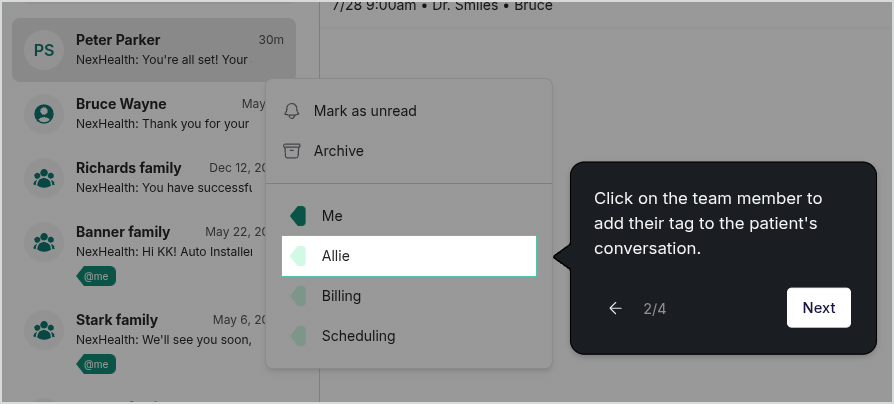
Tag a teammate or a team from the conversation menu in the Messages tab.
Anyone tagged can switch to the @me tab to see only the conversations waiting on them, so nothing sits unanswered because it wasn't clear whose job it was.
As patient volume grows, staying aligned on who's handling what gets harder. Staff tags keep that coordination inside the conversation, where the context already lives.
Step by step Knowledge Base Guide →
Forms & Verification
Failed verifications now follow up automatically
When a verification check fails because of a patient detail mismatch or inactive coverage, NexHealth automatically messages the patient to collect corrected information and re-runs the check. No one on your team has to track the patient down before the visit.
Two new templates power this: Insurance Verification – Patient Details and Insurance Verification – Inactive Coverage. Both are live for all Verification customers and turned on by default. You'll find them in the Template tab if you'd like to adjust the wording.
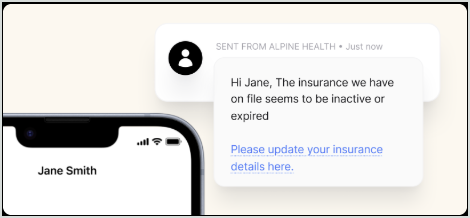
Patients get an automatic text asking them to update their insurance details - no staff action required.
Step by Step Knowledge Base Guide →
Scan the insurance card instead of typing it in
Patients can now scan their insurance card directly in the new Dental Insurance Verification Form, and NexHealth captures the details automatically. Fewer typos, fewer failed verifications caused by bad data, and faster check-ins.
No Setup required
If you are already using our Dental Insurance Verification Form, it is updated now! To add it, go to Manage Forms and select it from our pre-built form templates.
Included for practices on both the Forms and Insurance Verification packages.
Integrations
Automated verification is now live on Cloud9, eClinicalWorks, and Denticon
If your practice runs on one of these systems, automated insurance verification is now available to you. Practices previously using the manual process have already been updated to the automated version; there's nothing to set up, and coverage checks now run without staff intervention.


when you demo NexHealth in October